WordPress.com is one of the world's most popular commercial platforms for building and hosting websites, blogs, and online stores. Operated by Automattic, co-founded by Matt Mullenweg—one of WordPress's creators—it gives users an all-in-one solution that includes hosting, domain registration, design tools, and technical support. Don't confuse WordPress.com (the service) with WordPress.org (the free, open-source software you install on your own server). WordPress.com is known for its flexibility and scalability, so you can launch either a simple personal blog in five minutes or a complex corporate website.
The platform serves a wide range of users: from beginners with no web development experience to bloggers, freelancers, small businesses, and even large corporations seeking a reliable and robust foundation for their projects. WordPress.com makes website creation accessible to everyone. And to make launching your project even more affordable, look for a current WordPress promo code.
How to save money using WordPress
While WordPress.com offers paid services, there are plenty of ways to reduce the cost of building and maintaining your site, especially in the early stages. Coupons, promo codes, and discounts can all help make the platform more affordable.
- Start with the Free Plan. This is your best way to save. WordPress.com offers a no-cost tier that includes everything you need to launch a basic site: 3 GB of storage, standard themes, and access to core features. This plan has limitations (for instance, your site will display WordPress.com advertising), but it's ideal for testing the platform, creating content, and understanding what features you'll need down the road before spending money or applying a promo code or coupon for upgrades.
- Choose annual billing. This is the best way to save on any paid option. When you pay for a year upfront, WordPress.com provides substantial discounts compared to monthly billing. Savings can reach 20-30%, which is like getting several months free. Combining annual billing with a coupon or promo code makes these savings even better.
- Select the right plan. Don't overpay for features you won't use. Carefully review the differences between tiers to find what works best for your needs:
- Personal is ideal for simple personal sites, portfolios, or blogs with a custom domain.
- Premium suits people who want more design capabilities (advanced blocks, CSS), monetization through your own advertising, and Google Analytics integration. Promo codes can occasionally make upgrading to Premium more affordable.
- Business and Commerce are the most powerful options, necessary for installing plugins from WordPress's extensive library, uploading custom themes, and building a fully functional online store. Discounts and coupon offers sometimes apply to these higher tiers. By selecting an option that closely matches your current requirements, you avoid unnecessary expenses while maximizing any available promo code or discount.
- Explore themes and block patterns. Before paying for a premium theme, check out WordPress.com's extensive library of no-cost themes. Many feature professional designs and flexible customization options. You can also use Block Patterns—pre-made block combinations that let you create impressive page sections (galleries, testimonial columns, pricing tables) in one click. Some coupon or promo codes also provide discounts on select premium themes, so it's worth looking into.
- Free domain for a year. All paid WordPress.com plans with annual billing come with domain registration at no extra charge for the first year. This saves $15-25 when you're getting started, and occasionally, discounts or coupon deals can lower costs on domain renewals or add-ons.
The Adventures of a Couponista team knows that starting a new project takes money. We track special offers from WordPress.com and publish all active promo codes, coupons, and promotional details on our page. Our goal is to help you launch the site you've been dreaming of while keeping costs down by finding every available discount.
How to apply a WordPress promo code
If you've found a coupon or promo code on adventuresofacouponista.com, applying it at checkout is simple. Keep in mind that coupon codes typically work for new purchases rather than renewals, unless the promotion indicates otherwise.
- Copy the promo code from our site.
- Head to wordpress.com and choose the subscription tier that fits your needs (Personal, Premium, etc.) by clicking "Upgrade" or "Select".
- Create or log in to your account to continue.
- On the checkout page, select your billing term (annual or monthly).
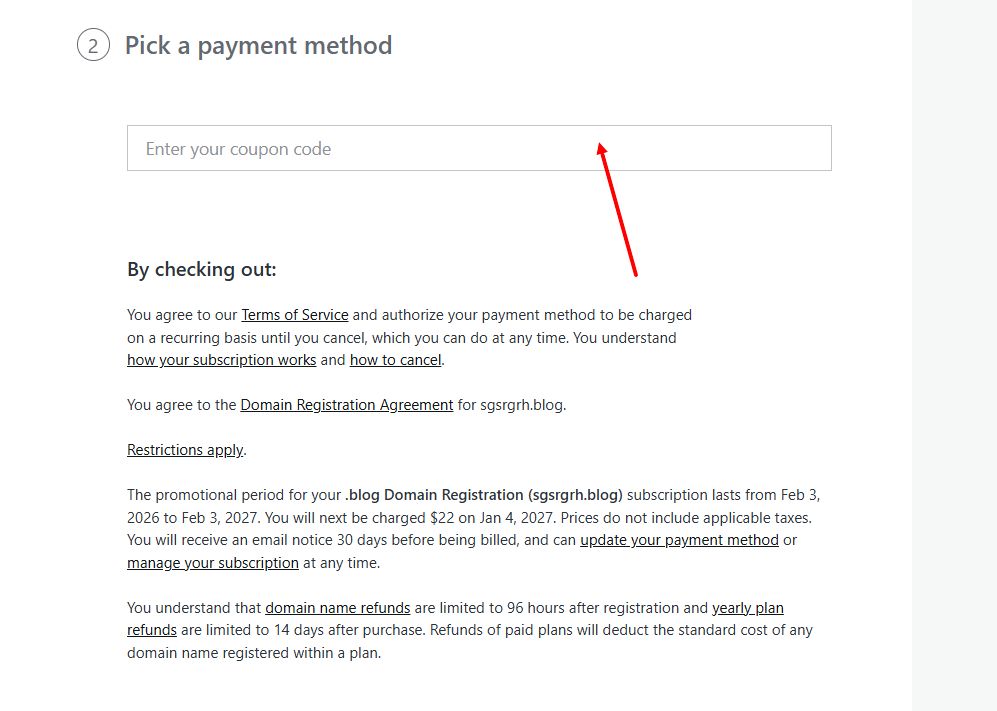
- Below the total amount, look for the link "Have a coupon code?".
- Click it, paste the copied promo code into the field that appears, and click "Apply."
- The discount will be reflected, and you can complete payment at the reduced price.
Current promotions
WordPress.com offers several ongoing and temporary promotions:
- Annual billing discount: An ongoing offer that lets you save up to 30% on any paid subscription compared to monthly billing.
- Free domain for 1 year: Included with all annual paid subscriptions. After the first year, you'll need to renew the domain at standard rates.
- Seasonal sales: Substantial discounts on new subscriptions during major sale events like Black Friday and Cyber Monday.
- Free option: An ongoing opportunity to create and run a site without any financial investment, perfect for testing ideas.
We gather all current offers for you on the WordPress page at Adventures of a Couponista.
Advantages and features
- Reliability and security: WordPress.com handles all hosting concerns, automatic core and plugin updates, daily backups, and protection against hacking, spam, and DDoS attacks. SSL certificates are included by default.
- Scalability: You can start with a simple blog on the free tier and easily upgrade to a more powerful plan over time to add an online store or complex functionality without changing platforms.
- All-in-one: The platform provides hosting, domain, SSL certificate, CDN for faster loading, and 24/7 technical support (on paid plans) in one package.
- Powerful plugin ecosystem: Business and Commerce plans unlock access to 50,000+ plugins, enabling virtually any functionality: from advanced SEO optimization (Yoast SEO) to online booking systems.
Product and service range
WordPress.com doesn't sell physical products—instead, it offers services through different pricing plans:
- Free: Basic plan to get started on WordPress.com (includes WordPress.com ads).
- Personal: For personal sites, includes a custom domain and removes WordPress.com ads.
- Premium: Enhanced design capabilities and monetization tools (WordAds).
- Business: Install plugins and themes, use advanced SEO tools, and get 200 GB of storage.
- Commerce: Full set of features for creating and managing an online store powered by WooCommerce.
- Additional services: Domain registration and transfers, professional email addresses through Google Workspace.
Choosing WordPress.com means betting on a time-tested, reliable, and flexible solution for your online presence. It serves as a dependable partner in your growth: from a small idea to a full-scale online business. The platform provides all the necessary tools while offering options for every budget—from completely free to powerful enterprise solutions—and often includes ways to save through discounts or a coupon, making it even easier to get started.